Reading the Summary Card and Period Filter
At the top of the Home screen sits the Summary Card, giving you an instant view of your counter's finances. The card has two swipeable slides, paired with the Total Transaksi (Total Transactions) counter and Period Filter right above it.
Total Transactions and Period Filter
The top blue header row shows two key controls:
- Total Transaksi (left): counts customer transactions recorded within the active period.
- Period Filter (right): dropdown chip that filters your summary metrics and recent transaction list. The app remembers your last selected period automatically.
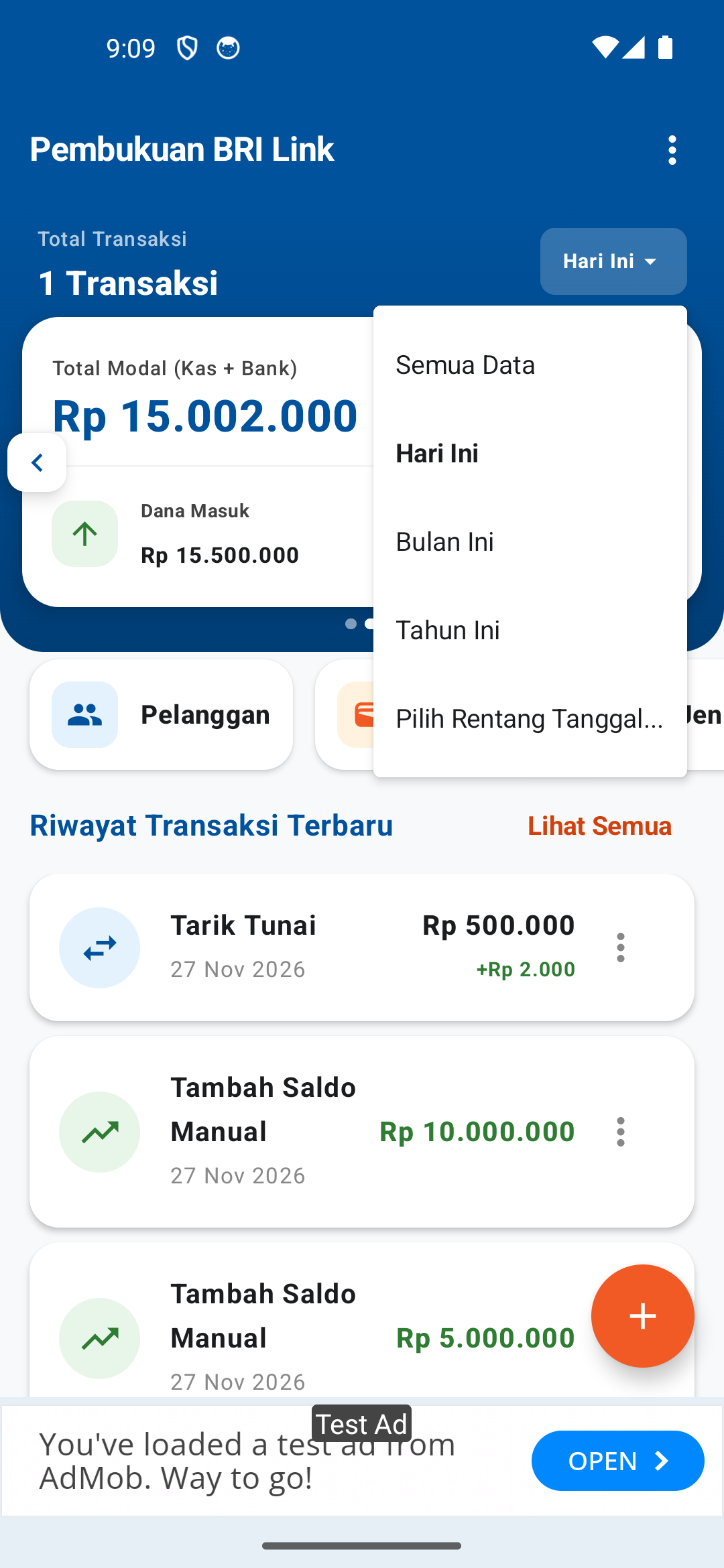
Available period options:
- Semua Data (All Data): includes every record from the very start with no date limit.
- Hari Ini (Today) (default): shows only today's transactions and cash flow. Ideal for daily closing checks.
- Bulan Ini (This Month): summarizes records from the 1st through the end of the current month.
- Tahun Ini (This Year): summarizes records across the current calendar year.
- Pilih Rentang Tanggal... (Select Date Range...): opens a calendar picker so you can choose any start and end date, such as a weekly recap.
Slide 1: Wallet Balances, Total Balance, and Net Profit
By default, the Summary Card opens on Slide 1. Swipe left on the card or tap the > arrow on the right edge to switch to Slide 2. Two dot indicators below the card show which slide you are viewing.
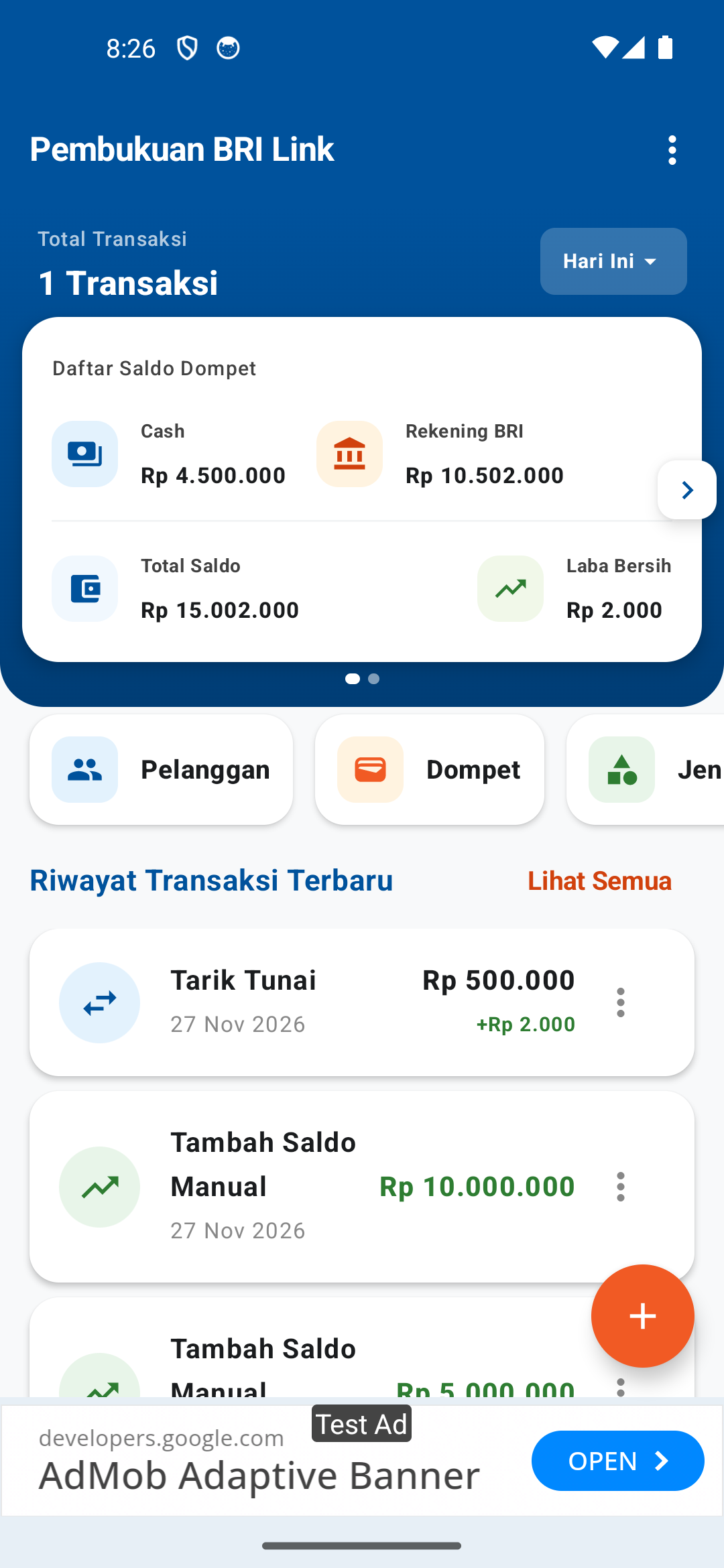
What appears on Slide 1:
- Daftar Saldo Dompet (Wallet Balances): displays the live current balance of each wallet (such as Cash and Rekening BRI). If you have more than two wallets, swipe this row horizontally to view the rest.
- Total Saldo (Total Balance): the combined current balance across all active wallets. In the example above, Cash
Rp 4.500.000+ Rekening BRIRp 10.502.000=Rp 15.002.000. - Laba Bersih (Net Profit): total net earnings for the selected period, calculated from Service Fee minus Bank Admin across transactions in that period. The icon turns green when profit is positive or zero, and red if negative.
Slide 2: Total Capital, Funds In, and Funds Out
Swipe left on the card (or tap the > arrow on Slide 1) to view Slide 2. Use this view to track your combined working capital alongside total money flowing in and out during the active period. Swipe right or tap < to return to Slide 1.
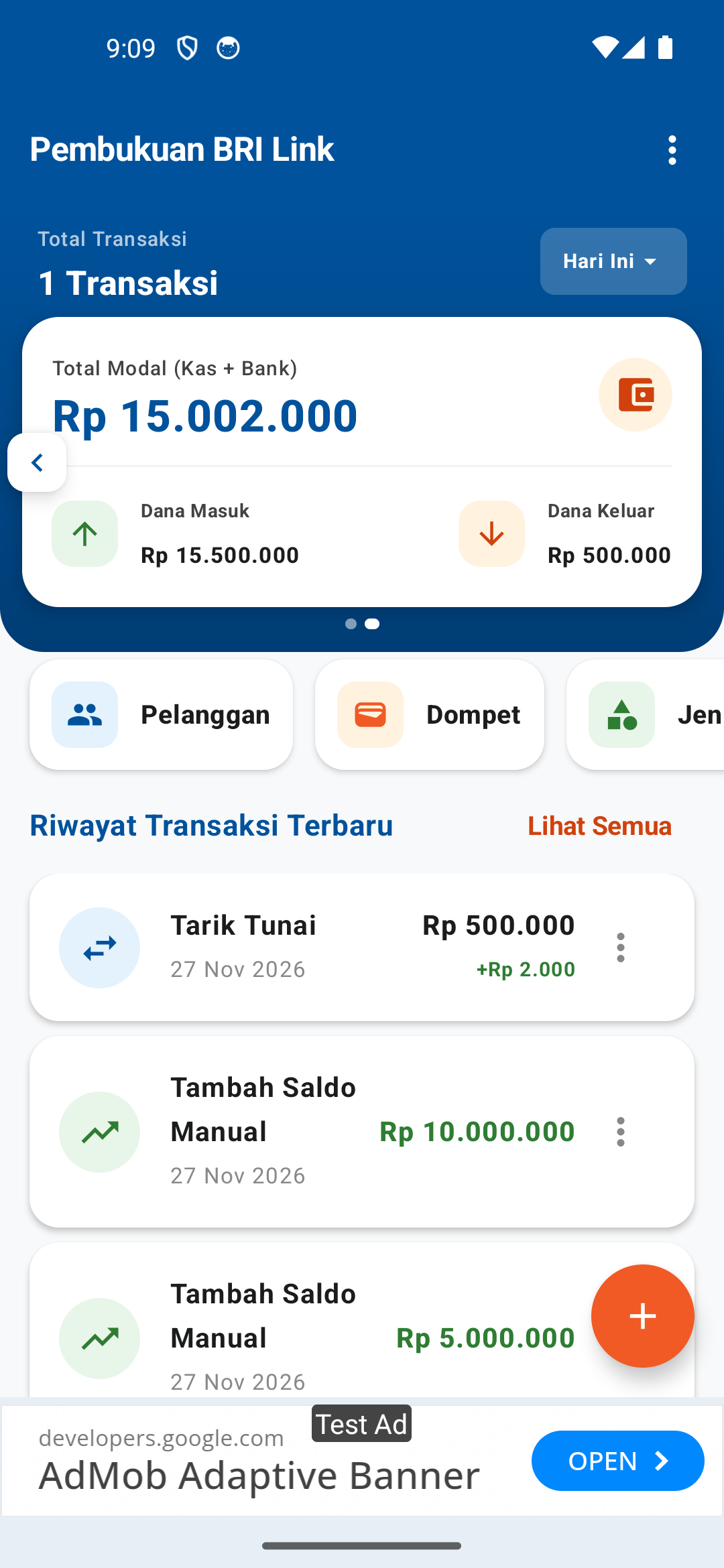
What appears on Slide 2:
- Total Modal (Kas + Bank) / Total Capital: your combined live working capital across cash on hand and bank/e-wallet accounts. This matches Total Saldo on Slide 1, making it easy to verify that your total capital stays intact as money moves between your cash drawer and bank account.
- Dana Masuk (Funds In): total amount credited to destination wallets during the selected period. This includes customer transaction inflows as well as manual Tambah Saldo Manual entries. In the screenshot above,
Rp 15.500.000comes from the initial Cash top-up (Rp 5.000.000), initial Rekening BRI top-up (Rp 10.000.000), and theRp 500.000credited to Rekening BRI from the Cash Withdrawal transaction. - Dana Keluar (Funds Out): total amount debited from source wallets during the selected period, covering both customer transactions and manual Tarik Saldo Manual withdrawals. In the example above,
Rp 500.000reflects the cash handed out from the Cash wallet during the Cash Withdrawal.
Which Metrics Follow the Period Filter?
Not every number on the Summary Card changes when you switch the Period Filter. Use the table below as a quick reference when reconciling your books:
| Home Screen Metric | Follows Period Filter? | Details |
|---|---|---|
| Total Transaksi (Total Transactions) | Yes | Counts customer transactions in the selected period (excludes manual balance edits). |
| Daftar Saldo Dompet (Wallet Balances) | No | Always shows each wallet's current live balance. |
| Total Saldo (Total Balance) | No | Always shows the live combined balance of all wallets. |
| Laba Bersih (Net Profit) | Yes | Total (Service Fee - Bank Admin) within the selected period. |
| Total Modal (Kas + Bank) | No | Always shows current working capital (same value as Total Saldo). |
| Dana Masuk (Funds In) | Yes | Total amount entering destination wallets in the selected period. |
| Dana Keluar (Funds Out) | Yes | Total amount leaving source wallets in the selected period. |
| Riwayat Transaksi Terbaru (Recent History) | Yes | Lists up to the 10 latest transactions matching the selected period. |